Working through the BOTSv1 training dataset to practice SPL and SOC investigation methodology. This is a known training scenario with published answers; the goal here is to demonstrate process, not to present original research.
Starting Point
To begin the investigation, I first ran a query to identify which index held data worth working through. Once the index was confirmed, I reviewed the available log sources (IIS web logs, stream:http, Suricata, Sysmon, Windows Security, and a Fortinet firewall, among others) and ran the query below to identify the top-talking IP:
index=* sourcetype=stream:http | stats count by src_ip | sort -count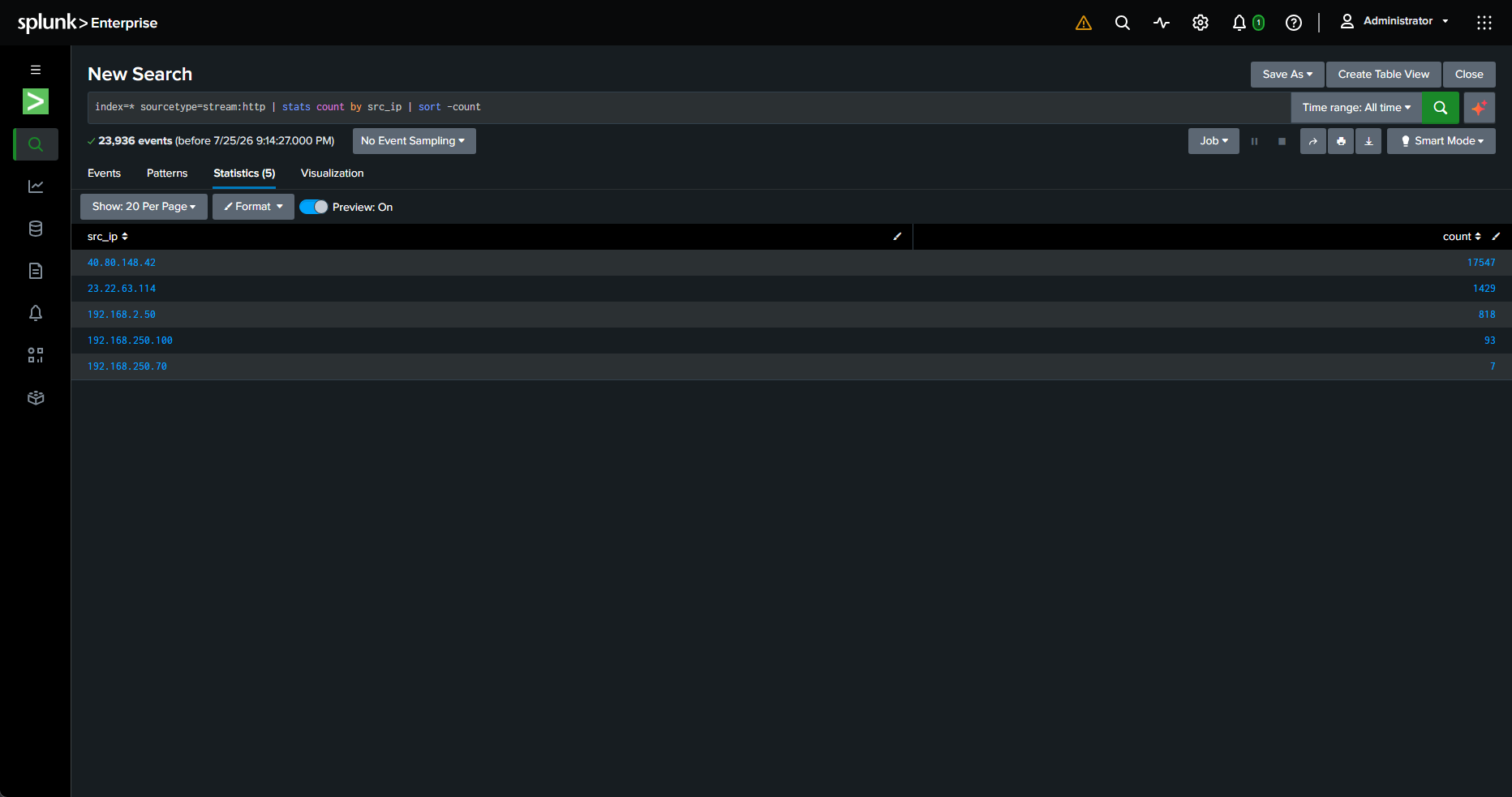
IP 40.80.148.42 was the loudest by a wide margin, with a count of 17,547. That volume alone doesn’t prove anything malicious, so the next step was to look at what it was actually doing.
Identifying the Activity
To see the raw traffic from that IP, I ran the following query:
index=* sourcetype=stream:http src_ip="40.80.148.42"I then wanted to check the user agent this IP was sending, since an automated scanner will usually give itself away there:
index=* sourcetype=stream:http src_ip="40.80.148.42" | stats count by http_user_agent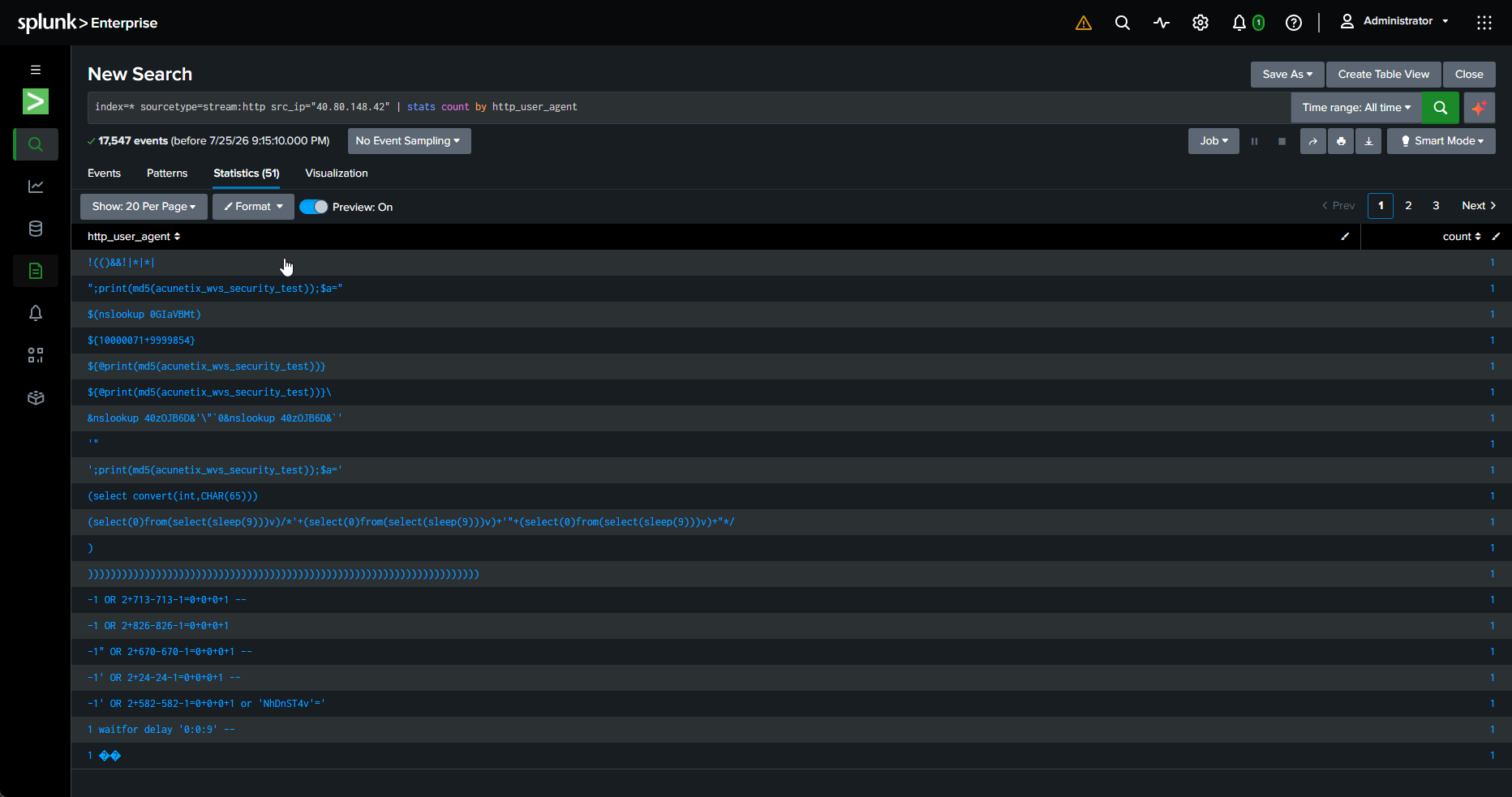
The results made the intent obvious: the “user agents” weren’t user agents at all; they were attack payloads being injected into the User-Agent header. The set was a mix of injection classes, not just one. There was SQL injection (time-based and boolean-based blind, e.g. waitfor delay '0:0:9' and (select(0)from(select(sleep(9)))v)), command injection ($(nslookup ...), &nslookup ...&), and clear fingerprints from the Acunetix web vulnerability scanner (acunetix_wvs_security_test). So this was an automated scanner throwing injection payloads across every field it could reach, including the headers.
Finding the Credentials
Knowing the target was a Joomla site, I looked at POST requests to the administrator path to see what was being submitted to the login and any admin functions:
index=* sourcetype=stream:http http_method=POST uri_path="*administrator*" | stats count by src_ip, uri_path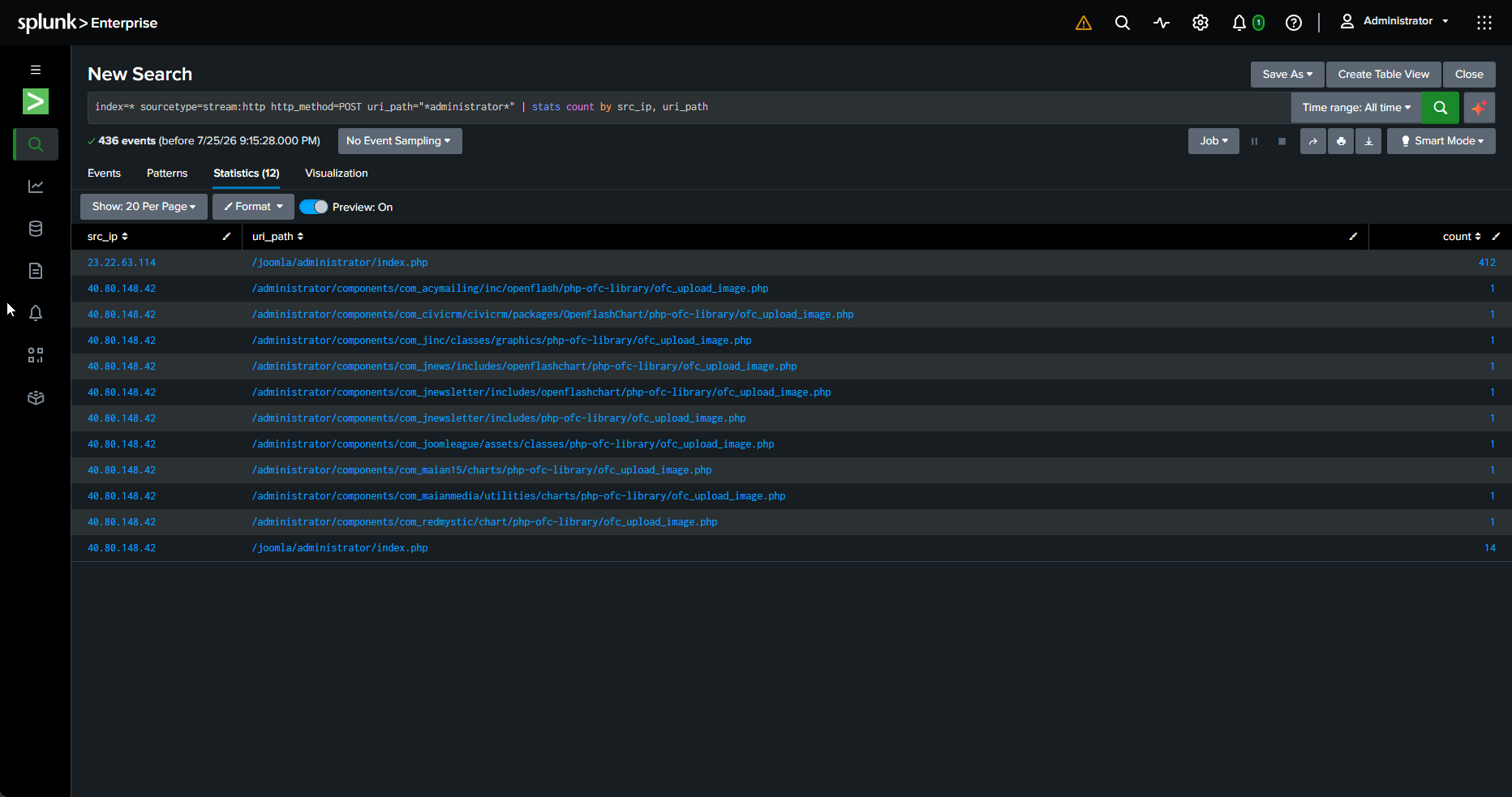
This stats query doesn’t show the request bodies itself; it returns counts and points you at where the interesting POSTs are concentrated. The credentials are in the raw events. Inspecting the form_data field on the returned events revealed the actual login attempt:
username=admin&passwd=batman&option=com_login&task=loginThe raw events also showed post-compromise activity in the same administrator POSTs: com_extplorer file-manager actions (browsing the server’s filesystem) and a large URL-encoded install_package=<?php ... payload, an obfuscated PHP web shell being uploaded into the web root (C:\inetpub\wwwroot\joomla\tmp). Those actions are only reachable from an authenticated admin session, which becomes important for confirming the login worked.
Two Different Attackers
Looking closer at the successful credential, I noticed something worth flagging: the brute-force and the interactive login came from two different hosts.
- The brute-force that cracked the password ran from 23.22.63.114 using the user agent
Python-urllib/2.7, an automated script. - The interactive login using the discovered password came from 40.80.148.42 in a real browser (
Mozilla/5.0 ... Trident/7.0), arriving from the admin login page.
Same password, two tools, two IPs. The attacker scanned and brute-forced from one host and then logged in by hand from another. That separation is easy to miss if you assume a single IP did everything.
Confirming the Login Actually Succeeded
A login attempt isn’t a compromise until the server confirms it accepted the credentials, so I didn’t want to assume success. I pulled everything 40.80.148.42 did against the administrator path in time order:
index=* sourcetype=stream:http src_ip="40.80.148.42" uri_path="*administrator*" | sort _time | table _time, uri_path, http_method, status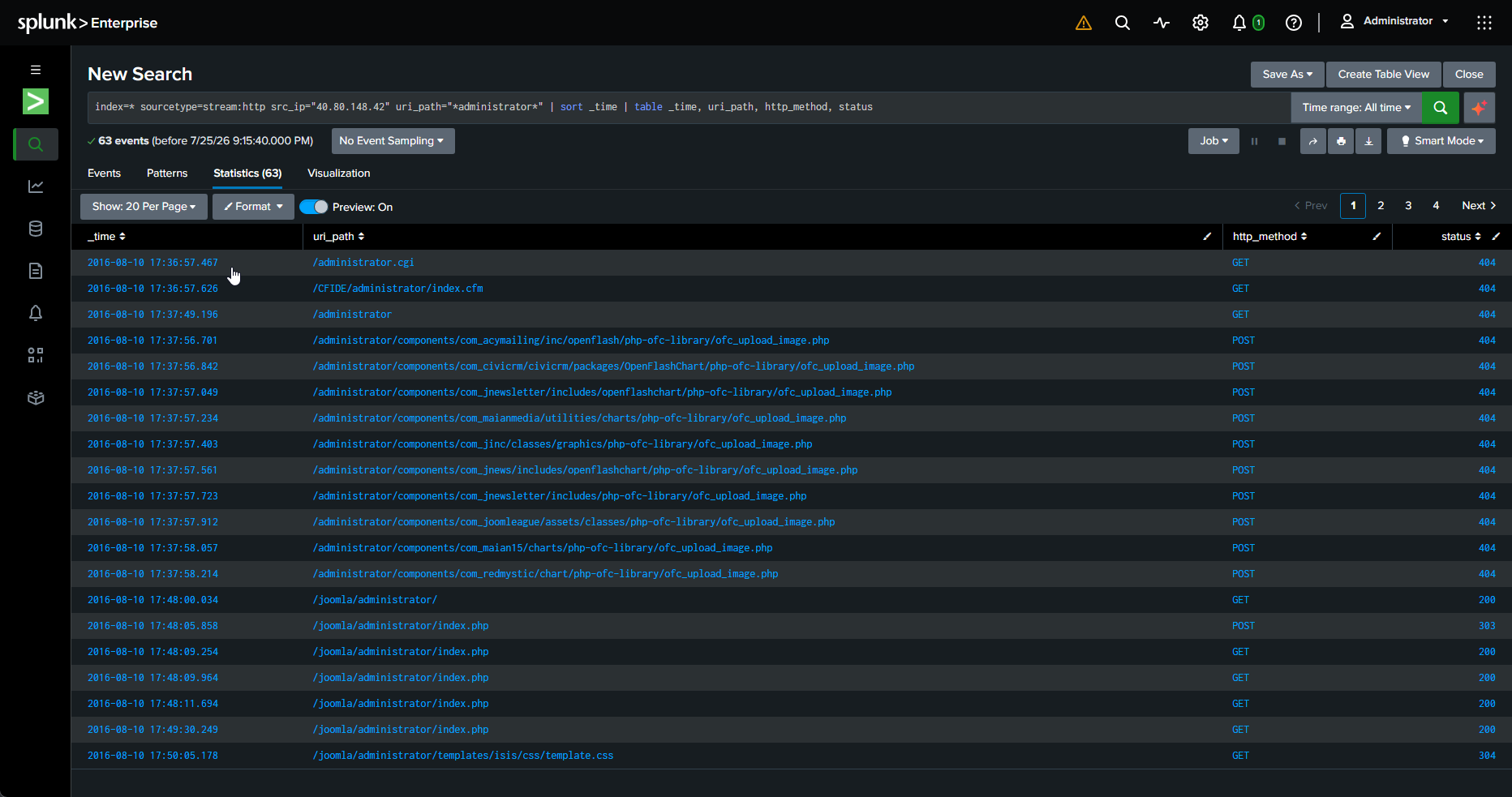
Read from top to bottom; the table tells the whole story:
- Early requests to paths like
/administrator.cgiand a run ofofc_upload_image.phpendpoints all returned 404, the scanner probing for known-vulnerable paths and finding nothing. - Then the sequence turns: a GET 200 loads the login page, a POST 303 submits
admin:batmanand redirects, and a series of GET 200 requests follow into/administrator/index.php, ending with the admin template’s CSS loading (304).
The key detail is that a successful Joomla login doesn’t return a 200; it returns a 303 redirect into the admin area. A failed login loops back to the login page. Here the 303 is bracketed by a GET of the login form before it and authenticated admin-panel requests after it, including admin UI assets that can only load inside a real session. That confirms the credential worked.
Full Chain
Reconstructed entirely from raw HTTP logs:
- Automated scan with Acunetix, throwing SQLi and command-injection payloads (404s, no success).
- Brute-force of the Joomla admin login from a Python script (23.22.63.114).
- Successful crack of the credential
admin:batman. - Interactive login from a browser (40.80.148.42), confirmed by the 303-then-200 sequence.
- File-manager activity via eXtplorer and upload of a PHP web shell to the web root for persistence.
Initial access through a foothold, with attacker infrastructure separation and successful-login confirmation all visible in the traffic.